tabsnap.
save open tabs as markdown, plain text, json, or a readme — then install from the browser store that matches your workflow.
your tab graveyard, made shareable. turn a live browsing session into a browser-session export for a slack thread, a github issue, a project readme, or a clean jq pipeline. optional tracking cleanup strips common marketing params before you copy or download. zero telemetry, zero account, no signup.



Need the shortest path? Open the install guide first, then choose Chrome, Firefox, or Edge. If you are comparing tools, the OneTab comparison and blog walkthrough are one click away. If you only have ten seconds, use the store button and come back to the guide later.
prefer the command line? tabsnap also ships as a free npm cli — pipe-friendly, offline, markdown / json / plain →
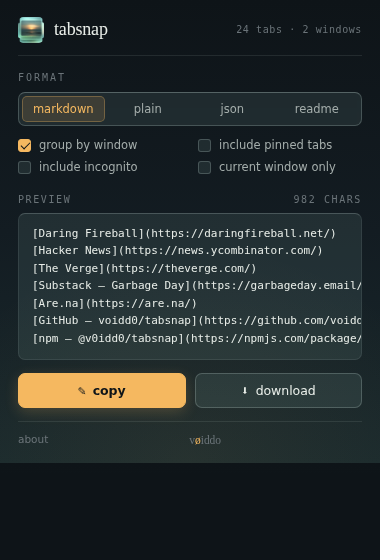
one click, four shapes of output.
markdown
nested list grouped by window, with hostnames as section headers. paste into a slack thread, a github issue, or a doc.
plain text
flat unicode list, indented urls. copy–paste-safe in environments that strip markdown formatting.
json
structured array, ready to feed back into another tool. matches the cli twin's output bytes exactly.
readme.md
full markdown document with a domain-summary table at the top. ready to drop into a project repo as receipts.
built for the moment you close the laptop.
research handoff
forty tabs of context, on its way to a doc. markdown it, drop it into the doc, leave a trail your future self can walk back through.
graveyard share
"look at my tab problem" — programmer twitter's most reliable post genre, but with receipts. formatted, sortable, share-ready.
readme drop
readme mode includes a domain-count table. drop it next to your code as receipts of where the ideas came from.
reads tabs only when you click.
tabsnap reads your open tabs only when you press the button. nothing is sent anywhere — there is no server. no telemetry, no account, no signup. the only way data leaves your browser is the clipboard or the download you triggered.
mit forever — the source is on github. fork it, audit it, ship a patch. the cli twin @v0idd0/tabsnap on npm shares the same engine.